Joe Fresh
As a UX designer for the Joe Fresh e-commerce app, I worked on the UX design efforts for Joe Fresh’s first mobile application. Collaborating with cross-functional teams, including Product Managers, Engineers, and Product Owners.
Key features of the app included:
🚀 Powered by Helios: Re-built from the ground-up with Loblaw Digital in-house Helios engine for improved performance and reliability.
🎀 SDUI components: Modern and customizable UX elements to support e-commerce campaigns big and small.
📱 Mobile-first design: Optimized for mobile with enhanced navigation, search and accessibility.

Role
UX Designer
Tools
Figma
Miro
Platforms
iOS
Team
Product Designers
Developers
Project Managers
Product Owner
🚀 Powered by Helios: Integration of the SDUI Design System & Token Library
During this project, I played a critical role in advancing the SDUI (Server-Driven UI) framework and integrating a robust design system. My contributions highlighted my ability to think critically and systematically while navigating complex challenges.
I worked extensively on token management, creating a comprehensive token library aligned with the JF brand. This involved defining and implementing scalable design tokens that ensured consistency across components and streamlined updates throughout the system.
🎀 SDUI Components: Enhancement of SDUI Components
Additionally, I extended existing components and contributed to the evolution of the design system by addressing gaps, improving flexibility, and enhancing usability. These efforts not only reinforced the system's robustness but also demonstrated my deep understanding of design principles and system architecture.
By combining technical expertise with a strategic approach, I was able to deliver a cohesive and scalable solution that supported both immediate project needs and long-term goals.
📱Mobile First: Mobile Optimization
The goal was to create the Joe Fresh e-commerce app aimed to streamline the shopping experience, offering features such as easy navigation, secure checkout, and seamless integration with loyalty programs.
By focusing on user-centered design principles and continuous improvement, we aimed to create a platform that not only drives conversions but also delights users at every touchpoint.

Phase 1
Discovery - Understand and Immerse
In order to understand our users we decided to conduct workshops, this was a great way to understand how they use current tools and what pain points they encounter.
Phase 2
Design - Create and Iterate
After gathering all the data and insights from our users we moved on to creating the first concepts. Underneath you can see the design process and journey we went through.

In transitioning Joe Fresh's web shop to a mobile app, our design explorations focused on optimizing the user experience for smaller screens while maintaining brand consistency and functionality. We began by analyzing user behavior and preferences through extensive research, identifying key pain points and opportunities for improvement.

Phase 3
Low-fi Concepts - Testing
Our goal was to check and test functionality of our early concepts with low-fi prototypes rather than the visual appearance of the product. Throughout the process, collaboration with stakeholders and continuous user testing ensured that our designs effectively translated the web shop's features into a cohesive and engaging mobile app experience, aimed at driving customer satisfaction and conversion rates.

Phase 4
Implementation - Collaboration with Developers
With the foundational work completed, Phase 4 focuses on executing the vision through close collaboration and rigorous testing to ensure a seamless launch.
Implementation and Development Collaboration
-
Partner with developers to integrate designs and features into the app, ensuring alignment with the project requirements.
-
Conduct regular syncs to address challenges, refine functionality, and maintain project momentum.
User Acceptance Testing (UAT)
-
Facilitate UAT sessions to gather feedback from key stakeholders and early adopters.
-
Identify and resolve any usability issues or bugs, ensuring the app meets end-user expectations.
Quality Assurance (QA)
-
Perform comprehensive QA testing to validate functionality, performance, and security.
-
Test across multiple devices to ensure consistent behavior and optimal performance.
Design Review and Final Adjustments
-
Conduct a final design review to ensure the app aligns with the initial creative and user experience goals.
-
Implement any last-minute tweaks to polish the user interface and interactions.
Final Phase - Launch Readiness
The team prepared for launch by finalizing documentation, marketing materials, and support resources. We then conducted a soft launch to gather additional insights before the full-scale rollout.
Let's dive in!
Discover Tab
The first one in the Discovery tab is where we have the opportunity to discover, get inspired and just see what's new and what's coming within the Joe Fresh assortment.


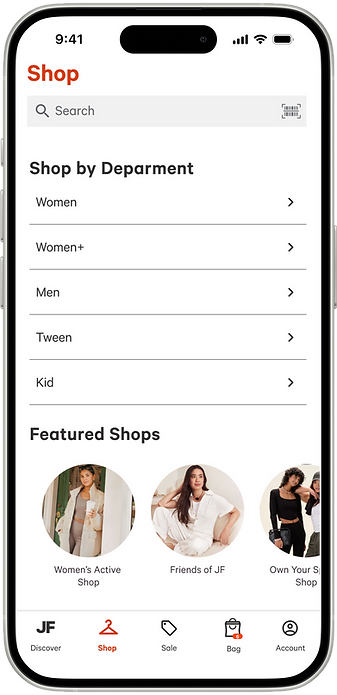
Shop Tab
The "Shop" tab serves as a central hub for browsing and exploring products based on categories, departments and more.
Sale Tab
This Sales tab serves as a dedicated section where users can easily discover and explore discounted or promotional items.
Showcasing ongoing sales, discounts, clearance events, or special offers prominently to attract users looking for deals and savings.
Highlighting specific categories or products that are currently on sale or promotion, often with eye-catching banners or badges indicating price reductions.


My Bag
My Bag tab serves as a centralized hub for users to review and manage items they intend to purchase. It provides a clear overview of selected products, including images, names, sizes, colors, quantities, and prices. Users can easily adjust quantities, remove items, or save them for later.
Account Tap
The Account tab enhances user engagement and satisfaction by providing a centralized hub for managing personal information, orders, preferences, and interactions with the e-commerce platform, ensuring a seamless and personalized shopping experience.

My Learnings!
This role provided me with the opportunity to tackle a wide array of challenges, significantly advancing my skills across various domains crucial for UX design:
-
Working on the development of a brand new app honed my ability to craft engaging user experiences that foster customer loyalty and retention.
-
Embracing design systems such as tokens, provided efficient methods for managing design properties and values across our system, ensuring consistency and scalability.
-
Collaborating closely with cross-functional teams, I strengthened my skills in user research, prototyping, and iterative design, which were essential in delivering a seamless and user-centric e-commerce platform.
These experiences not only expanded my technical proficiency but also equipped me with a comprehensive understanding of the intricate relationship between UX design and e-commerce, empowering me to contribute effectively to the strategic growth and user-centric evolution of digital retail experiences.